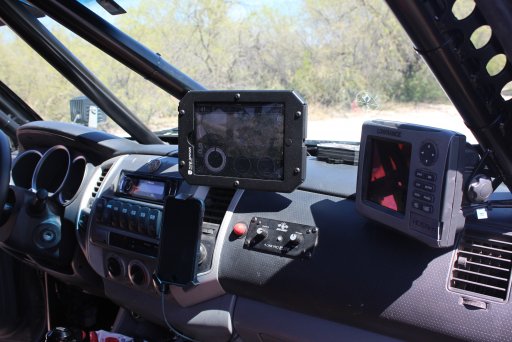
Tablets for navigation.

S4SQTCH

Rank V
Launch Member

Off-Road Ranger I

2,809
Salt Lake City, Utah
First Name
Dave
Last Name
Kaplan
Member #

1028

Ham/GMRS Callsign
KG7IGY / WRTJ268
I would like to ditch my aging Garmin for a more comprehensive map system with more capability. I know some people have used tablets for navigating, and I'm considering going that route.

I would like to know what others are using for this type of system - both hardware and software. I was wondering if an Amazon Fire tablet would be an inexpensive way to go? I know a lot of people use iPad Minis, but I don't have anything else from Apple so I'd like to stick to Android systems on either Google Play or Amazon stores.
 
Go Apple. You can get great nav software and the system has so many other uses. Cartoons and games for the kids, movies and overlander aids for you. I use a iPad on my windshield. If I could have both I'd get a a nav system an ipad, if only one, I'd get the iPod.
 
Last edited:
I use an iPad mini and a pro-clip dash mount. For apps, I use Gaia and have been recently trying out Hema, they seem very similar, but lean toward Gaia. I also travel with a Delorme GPS InReach Explorer for safety and some nav.
 
I've had several bad experiences with Apple. (I know, I'm the exception to the rule apparently.) We are Windows and Android based users simply for the flexibility it offers. We run a Samsung Tab S2 on a Ram Mount for our navigation. The 9.7" screen is awesome and easy on the eyes. We primarily use Gaia GPS App along with the OnXmaps "ROAM" App for a second opinion and the Offroad Atlas App for National Forest MVUMs. Of course, good ol' Google Maps is our go-to for paved road travel.

The kiddo's iPad (didn't buy, won it in a raffle) recently died a glitchy death and we replaced it with a Samsung Tab A. It's primarily the kid's entertainment tablet but we have our nav apps installed on it as well just in case we need a backup.

One word of advice... don't cheap out on your tablet decision. You'll be surprised at how many apps you want to run at the same time and having a serious processor and ram make a huge difference. We usually run Gaia, Weather, Google Maps, and Music apps all at the same time on the S2 and it doesn't even blink.
 
I'm another Android user. I also use a Samsung Tab S2 with flexible floor mount that can serve the passenger or the driver. I'm running GaiaPro and absolutely love it.
iPads are great and easy to use, but I like that I can add a microsd for added storage for music, movies, and lots of maps!!
 
I'm not interested in Apple at all, I have nothing else on iTunes so I can't use the same apps on my phone and whatever tablet I get, plus iThings are overpriced for what you get and I'd like to do this on a budget - which is why I asked about the Amazon Fire tablets as an option; they are relatively inexpensive, have decent displays and processors, and have expandable storage.
 
I'm not interested in Apple at all, I have nothing else on iTunes so I can't use the same apps on my phone and whatever tablet I get, plus iThings are overpriced for what you get and I'd like to do this on a budget - which is why I asked about the Amazon Fire tablets as an option; they are relatively inexpensive, have decent displays and processors, and have expandable storage.
I'm curious about the Fire Tablet as well, considering the price. But, I think Amazon heavily curates the apps, and I don't think they have the same functionality as a standard Android tablet (though I think you can sideload Android apps). I could be wrong though- hopefully someone w/ a Fire Tab will chime in...
 
I'm another Android user. I also use a Samsung Tab S2 with flexible floor mount that can serve the passenger or the driver. I'm running GaiaPro and absolutely love it.
iPads are great and easy to use, but I like that I can add a microsd for added storage for music, movies, and lots of maps!!
What he said... the SD card option is awesome because you could load tons of information on multiple cards and swap them out as needed!
 
I'm curious about the Fire Tablet as well, considering the price. But, I think Amazon heavily curates the apps, and I don't think they have the same functionality as a standard Android tablet (though I think you can sideload Android apps). I could be wrong though- hopefully someone w/ a Fire Tab will chime in...
It's not possible to install Android apps on a Fire tablet out of the box. Apparently you can reprogram it to do so: http://www.howtogeek.com/232726/how-to-install-the-google-play-store-on-your-amazon-fire-tablet/ (If that's an option.) No idea on how reliable this would be.

@TreXTerra Also, a huge issue I just discovered is that the Fire tablets don't seem to have GPS in them!

I suggest going with the Tab A if you're on a budget.
 
We have been testing iPad and navigation software for awhile now, here is my assessment.

There is no true replacement for a dedicated GPS unit. I personally run a Lowrance HDS-5m in my 2008 Tacoma and it is still my primary navigation device. I recently added my iPad mini to the mix running an app called LeadNav with pre downloaded satellite images and paired it with a Dual SkyPro bluetooth GPS receiver. The Lowrance is always more accurate to exact location, faster updating and being hardwired into the trucks electrical more reliable. Its never had a heat issue or system failure. The iPad has over heated on multiple occasions, battery life even when plugged in sucks and tends to be off in terms of exact location. That being said it has been a great tool to be able to use the sat maps to preview a road or pick out a potential campsite in advance and for the most part is a reasonably reliable GPS and could serve as your primary as long as you have a back up dedicated unit in case of failure which is what I will be doing in my 2017 Tacoma Build. My backup there will be an older but Garmin Montana hand held.

IMG_9732.JPG
 
  • Like
Reactions: Cam_Cam_Tech
I have yet to have my Samsung tablet overheat and the battery stays full while running multiple apps. I'm not sure why the iPad is having that issue @tubbsisland A backup GPS unit is a great idea if you're having battery issues, or if you're driving out of the areas you didn't plan for. I've had this happen! I went on a trip and downloaded the area I thought we'd be in, only to find out we were exploring some other areas too and I didn't have the map. I could have used my old Garmin Nuvi sitting at the house... :smile:
 
  • Like
Reactions: Lifestyle Overland
I have yet to have my Samsung tablet overheat and the battery stays full while running multiple apps. I'm not sure why the iPad is having that issue @tubbsisland A backup GPS unit is a great idea if you're having battery issues, or if you're driving out of the areas you didn't plan for. I've had this happen! I went on a trip and downloaded the area I thought we'd be in, only to find out we were exploring some other areas too and I didn't have the map. I could have used my old Garmin Nuvi sitting at the house... :smile:

Its not apps but functions that draw power. Brightness all the way up to see during the day, bluetooth and GPS on will drain it pretty quick even in AirPlane mode which is how it should be. Plugged in it holds pretty well but still drains. My iPad in standby will last 10 days or so.
 
Its not apps but functions that draw power. Brightness all the way up to see during the day, bluetooth and GPS on will drain it pretty quick even in AirPlane mode which is how it should be. Plugged in it holds pretty well but still drains. My iPad in standby will last 10 days or so.

Agreed on the functions draw for the most part, though some apps ramp up the processor pretty hard. On our Tab S2 we run full brightness, GPS on, bluetooth on, multiple apps with battery saver and auto dim turned off the whole time we are on the trail. As long as you stay plugged into a Qualcomm 2.0 or better charger it never drops below 100%. Unplugged it's about 2-3 hours with these settings or 6+ hours with conservative settings.

Charger we use:
 
Agreed on the functions draw for the most part, though some apps ramp up the processor pretty hard. On our Tab S2 we run full brightness, GPS on, bluetooth on, multiple apps with battery saver and auto dim turned off the whole time we are on the trail. As long as you stay plugged into a Qualcomm 2.0 or better charger it never drops below 100%. Unplugged it's about 2-3 hours with these settings or 6+ hours with conservative settings.

Charger we use:

Oh I get like 5-6 hours unplugged on the mini haha plugged it drops at a trickle but still drops.
 
  • Like
Reactions: Lifestyle Overland
That's a couple curious iPad issues. I use my old iPad 2 and I run all day with a Dual 150 NOT plugged in at all to exercise the battery and I still have plenty of battery left. Its kept on the mount without the need for a case and I've never had the need to run the screen at full brightness because it's not mounted close to the windshield. I've never had an Apple device overheat or otherwise fail. Hell, I have a first gen iPod mini that still works somewhere around here. I'm not trying to praise Apple products but I've had/still have a bunch of them and they've been bulletproof.
 
  • Like
Reactions: RiverCityDave