I-overlander app

MOAK

Rank V
Launch Member

Off-Road Ranger I

2,865
Wherever we park it will be home !!
First Name
Donald
Last Name
Diehl
Member #

0745

Ham/GMRS Callsign
WRPN 506
We’ve been using the iOverlander app now for 9 months. I find it infuriating that the maps on ioverlander do not match any other reliable maps- in print, nat geo, national forest maps, BLM, etc; or any reliable on line- Google Maps, NF maps, BLM maps. They also do not provide rt numbers, small towns, or geological landmarks. I think that for the subscription price that their cartographers could do a much better job. Let the discussion begin. Thanks
 
  • Like
Reactions: grubworm
I simply use it to find potential sites and then copy the GPS coordinates into GAIA or OnX. If I like the location I'm going to need to put it into one of those apps anyway. I don't find the map to be an issue for my purposes.
 
I simply use it to find potential sites and then copy the GPS coordinates into GAIA or OnX. If I like the location I'm going to need to put it into one of those apps anyway. I don't find the map to be an issue for my purposes.
Ah- that’s the key- if you like the location. Today’s example- as we looked for a rustic campsite/grounds according to i overland was very near a lake. That lake does not exist, we got to the site and no lake within 15-20 miles. The geographical features did not match on Gaia, google or any paper maps. Not a big deal for those that rely solely on digital maps, but I like to see some relativity and the only way to do that is with paper maps. Gaia comes close, but still lacks relativity. By that I mean, we do not like to camp anywhere near any cities or major roadways. Hopefully once we get west it’ll work a lot better as it worked well for us in Newfoundland.
 
  • Like
Reactions: Kent R
Ah- that’s the key- if you like the location. Today’s example- as we looked for a rustic campsite/grounds according to i overland was very near a lake. That lake does not exist, we got to the site and no lake within 15-20 miles. The geographical features did not match on Gaia, google or any paper maps. Not a big deal for those that rely solely on digital maps, but I like to see some relativity and the only way to do that is with paper maps. Gaia comes close, but still lacks relativity. By that I mean, we do not like to camp anywhere near any cities or major roadways. Hopefully once we get west it’ll work a lot better as it worked well for us in Newfoundland.
Moak, I have found it takes lots of different platforms to get any good results. OB1, Gaia, OnX, and so on, but not iOverlander anymore due to the lack of pre-post verification and the cost.

Times are changing, with StarLink I tend to use Google more and more, local points of interest come up and often so do dispersed campsites quite often. AI has a-lot to do with that.

Have fun up there!
 
Moak, I have found it takes lots of different platforms to get any good results. OB1, Gaia, OnX, and so on, but not iOverlander anymore due to the lack of pre-post verification and the cost.

Times are changing, with StarLink I tend to use Google more and more, local points of interest come up and often so do dispersed campsites quite often. AI has a-lot to do with that.

Have fun up there!
Well, I’m a little late to the digital mapping/travel world. Still we have the bottom center console of the 350 full of Nat geo maps & such. We have Gaia as well and I’ll hopefully learn to use it. When the i overlander subscription expires I’m letting that go. Truthfully, between our paper maps, Starlink and Google Maps/Earth we will still manage to get lost for a week or two in some nice places. On another note; after searching in a lot of gas station C stores, I went into a truck stop and asked the young man at the fuel desk if they had any road atlases. He looked at me like I had Rosie Greer growing out of my shoulder. The kid had no idea what I was asking about. We did get a good Nat Geo atlas of the US & southern Canada thru Amazon.
 
I hardly use iOverlander anymore. In my experience, many POIs are outdated—this may of course also be due to the travel region, of course—and as I said, I haven't used it for a long time for this reason. Maybe it has improved again, who knows. Otherwise, I try to use as many sources as possible when traveling including satellite maps to get the full picture. With travel experience and a good instinct, you can discover many great POIs even on a normal, good-quality map.
 
  • Like
Reactions: MOAK and Kent R
I simply use it to find potential sites and then copy the GPS coordinates into GAIA or OnX. If I like the location I'm going to need to put it into one of those apps anyway. I don't find the map to be an issue for my purposes.

X2, this is exactly how I use it. It’s a few button pushes away from viewing the sites in a much better (and ones personal preference) mapping application. I’ve used iOverlander for hundreds of POI’s, up and down the Americas, Africa, Europe, etc. I simply can’t think of another resource that is as helpful in all of those locations. I admittedly don’t use it nearly as much for travel here in the Western US but it’s still been a resource.

Perhaps my wants/needs out of it are different… I pretty much use is exclusively to find camp locations, immigration/customs offices, embassy’s, etc. I’ve never even considered it for route finding or planning, just points.
 
This is all good advice, I’ve tried to consider it for route planning, before dumping the site into Google Maps. An adjustment in my thinking is in order as it seems it isn’t capable of doing what I ask of it. Gaia is still a puzzle I’m figuring out. Great conversation!
 
  • Like
Reactions: El-Dracho
Ah- that’s the key- if you like the location. Today’s example- as we looked for a rustic campsite/grounds according to i overland was very near a lake. That lake does not exist, we got to the site and no lake within 15-20 miles. The geographical features did not match on Gaia, google or any paper maps. Not a big deal for those that rely solely on digital maps, but I like to see some relativity and the only way to do that is with paper maps. Gaia comes close, but still lacks relativity. By that I mean, we do not like to camp anywhere near any cities or major roadways. Hopefully once we get west it’ll work a lot better as it worked well for us in Newfoundland.

I've been thinking about your dilemma about the camp site by the lake. Care to share what the location was and camp site name? I'm interested to see how for this example iOverlander compares data to what GAIA and OnX have. I haven't had issues with iOverlander but now am thinking about how much trust I can put into it.
 
Go
I've been thinking about your dilemma about the camp site by the lake. Care to share what the location was and camp site name? I'm interested to see how for this example iOverlander compares data to what GAIA and OnX have. I haven't had issues with iOverlander but now am thinking about how much trust I can put into it.
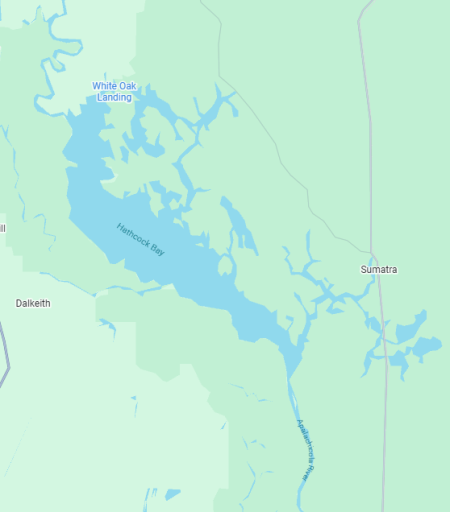
Go to Google Maps, or pull out a paper map of Fla or the Apalachicola National Forest. From the gulf, follow the Apalachicola river north until you reach a body of water which is Hathcock Bay. This body of water or large swamp, does not exist on i overlander. This is but one example of the discrepancies between maps. However, it is a learning curve for us coming from the world of paper maps only. We decided before venturing out full time that it was high time for us to learn how to navigate digitally, lest we end up collecting a huge number of paper maps that we do not have the stowage capacity for.
 
Go

Go to Google Maps, or pull out a paper map of Fla or the Apalachicola National Forest. From the gulf, follow the Apalachicola river north until you reach a body of water which is Hathcock Bay. This body of water or large swamp, does not exist on i overlander. This is but one example of the discrepancies between maps. However, it is a learning curve for us coming from the world of paper maps only. We decided before venturing out full time that it was high time for us to learn how to navigate digitally, lest we end up collecting a huge number of paper maps that we do not have the stowage capacity for.
If this is truly swamp then google maps may be the misleading one.
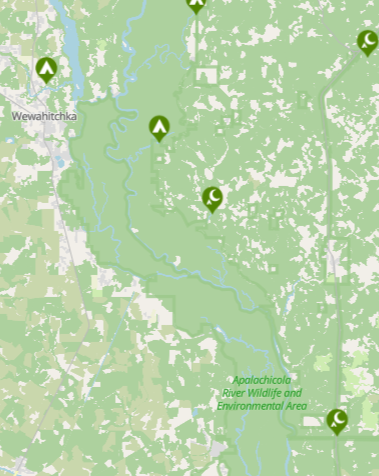
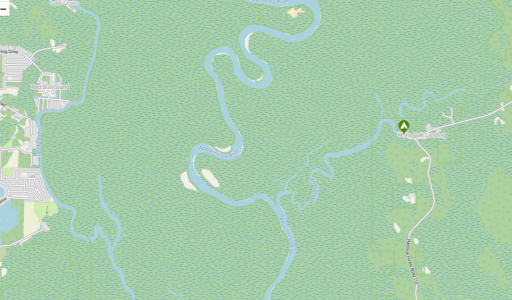
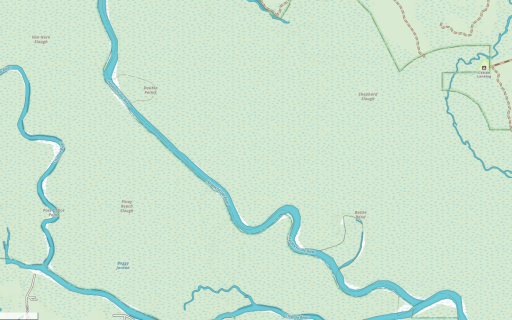
Just wanted to give you an idea of how each mapping software displays the same general area. Basic idea is that only Google maps shows a large body of water.
Thought the comparison might be useful if you've not seen all 3 apps map output

Google Maps
1770063591785.png
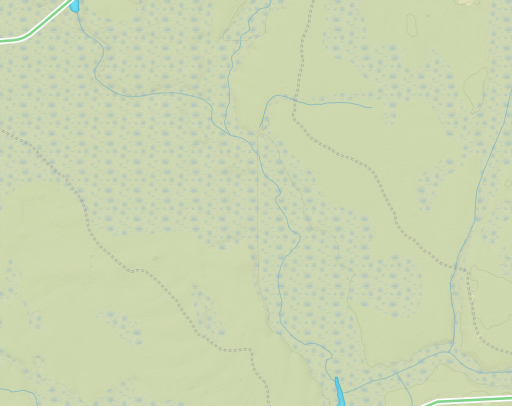
Here is iOverlander zoomed out of the area in question. You can see a river winding thru it.
1770063516898.png
What is shown as water in Google Maps is just kinda green here. But if you zoom in....

1770063553525.png
you see references to water or more correctly marsh land.

Below is GAIA, similar to above
1770063745266.png


And here is OnX
1770063776745.png
 
  • Like
Reactions: Kent R
Yes, that’s what I’m seeing as well. It’s sometimes very confusing when that happens with coastlines, and general terrain. Being new with this digital, I’m sure we will get up to speed quickly and learn how & what to use for navigation as we go along. Thanks for all conversation.!
 
I am sitting now on my camp chair in a nice out of the way camp spot adjacent to a beach in Morocco that I found in iOverlander. The thing that it does well is to provide camp spots, notes on good places to eat and mechanic shops, etc and depending on which area of the world you’re currently in that info may be current and of good use or very dated and not much use. I have found that it has provided current useful info for West Africa, Mongolia, and Baja when traveling in those areas. It’s info for the US is sparse and useless.

Their mapping system isn’t as detailed as Gaia and other platforms and you have to use both and switch between but I also have found that I can export the iOverlander waypoints to GPX or other formats and import them into Gaia.
 
Well, I’m a little late to the digital mapping/travel world. Still we have the bottom center console of the 350 full of Nat geo maps & such. We have Gaia as well and I’ll hopefully learn to use it. When the i overlander subscription expires I’m letting that go. Truthfully, between our paper maps, Starlink and Google Maps/Earth we will still manage to get lost for a week or two in some nice places. On another note; after searching in a lot of gas station C stores, I went into a truck stop and asked the young man at the fuel desk if they had any road atlases. He looked at me like I had Rosie Greer growing out of my shoulder. The kid had no idea what I was asking about. We did get a good Nat Geo atlas of the US & southern Canada thru Amazon.

Yah. Gone are the days when you can get a map - ANY map - at a gas station. Nor does anyone who works at one actually live locally and can direct you to the nearest "x".

Cant get a blast dang thing in a store anymore

Get my atlas from AAA.
 
  • Like
Reactions: OTH Overland
Yah. Gone are the days when you can get a map - ANY map - at a gas station. Nor does anyone who works at one actually live locally and can direct you to the nearest "x".

Cant get a blast dang thing in a store anymore

Get my atlas from AAA.
You can still get incense, cheap trinkets, and year old Ding Dongs. what more does a traveller need anymore lol... I still love my paper maps, have USGS topo maps for my whole state from my SAR days, and have a big box of maps i dig through before a trip out of state. Cant get past spreading a big map out on the hood and everyone gather round and discuss the days adventure.
 
  • Like
Reactions: ThundahBeagle
You can still get incense, cheap trinkets, and year old Ding Dongs. what more does a traveller need anymore lol... I still love my paper maps, have USGS topo maps for my whole state from my SAR days, and have a big box of maps i dig through before a trip out of state. Cant get past spreading a big map out on the hood and everyone gather round and discuss the days adventure.

That's what hoods, tailgates and to a lesser extent wide, flat center console lids are for - that and eating lunch
 
  • Like
Reactions: OTH Overland