Ask About OB1, The Overland Bound App

are there downloadable instructions one can get for all this? I guess I'm just an old guy because even if the videos are out they just move faster than I learn. and the forums are great but when I'm on a trail or out for the weekend I can't pull up the forum to answer a question about a button or a how to and its frustrating to just click buttons until the map is a mess and I'm pissed.
Hi Barney!

It's been a busy day! I got your message as well - but thought I would answer here for everyone's info!

Written documentation is currently in development, but not done yet unfortunately. In the meantime, I'm glad to answer your questions here about things you are trying to do.
 
Am I correct in assuming that the Expedition Tier upgrade needs to be purchased through the app rather than on the website store? I was looking around the store today, but don't see anywhere to do that.
 
Last edited by a moderator:
Am I correct in assuming that the Expedition Tier upgrade needs to be purchased through the app rather than on the website store? I was looking around the store today, but don't see anywhere to do that.


Correct at this time. I moved the "Bug" question to that section...

Jim
 
Hi Barney!

It's been a busy day! I got your message as well - but thought I would answer here for everyone's info!

Written documentation is currently in development, but not done yet unfortunately. In the meantime, I'm glad to answer your questions here about things you are trying to do.
Thank you Michael.
 
  • Like
Reactions: Michael
I have a gpx map a friend sent me. I’d like to load it on my OB1. I have expedition level. How do I upload a map?
 
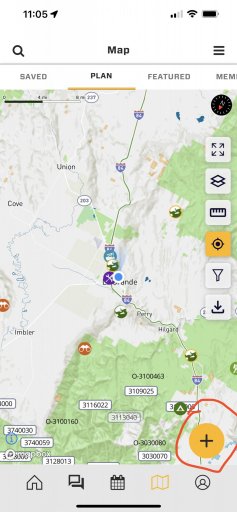
@barnstormers fallow the screenshots below in order after opening OB1 to the map tab.

Start by clicking the plus at the lower right hand corner.
B97D97FF-F111-40D5-AA1B-77610A9A65E6.jpeg

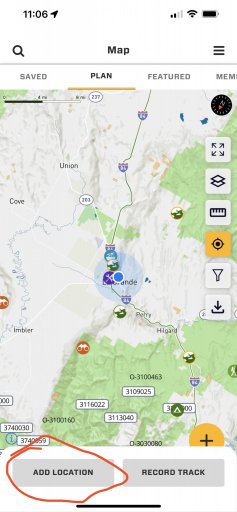
Next select add location
0F904A38-CD45-4F9F-A824-BD4E04DF81F9.jpeg

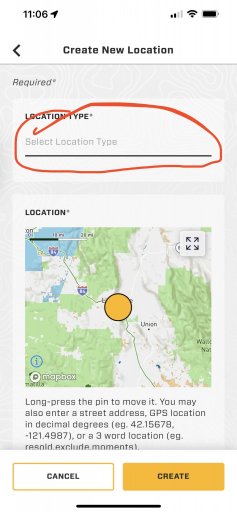
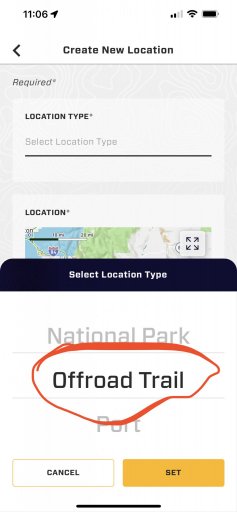
Location Type needs to be a off-road trail
DECAE946-486F-4272-9778-84DE172AB5AF.jpeg3E149430-5539-4618-AF92-78F253212831.jpeg


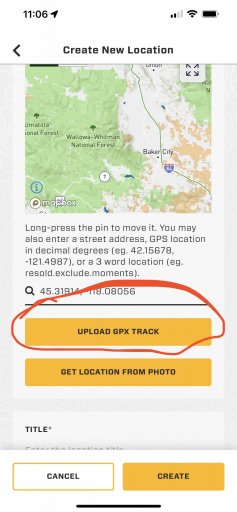
Upload GPX Track… on the next screen not pictures you have the option to make the track public or private.
4503A1F3-D873-4F69-BCDE-5A89F959D618.jpeg


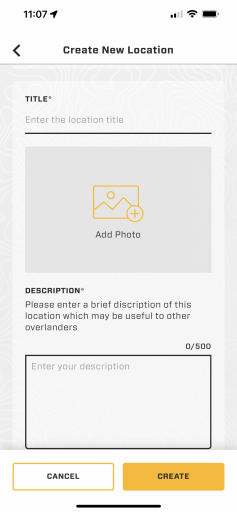
Finish filling out the details of the GPX track. Start with giving it a name, add a picture if you have one, give it a description. Then click creat

3F874E55-2BD8-4A75-9CC1-77B77CF4C6ED.pngafter
 
  • Like
Reactions: barnstormers
@barnstormers fallow the screenshots below in order after opening OB1 to the map tab.

Start by clicking the plus at the lower right hand corner.


Next select add location


Location Type needs to be a off-road trail


Upload GPX Track… on the next screen not pictures you have the option to make the track public or private.


Finish filling out the details of the GPX track. Start with giving it a name, add a picture if you have one, give it a description. Then click creat

after
Mike, when i click the yelow plus at the bottom of my map it goes to create rally point , no option to add location.. Is thiis due to being a legacy member and not expedition tier? was trying to uplaod GPX from Gaia from my trip last week. Thanks
 
Mike, when i click the yelow plus at the bottom of my map it goes to create rally point , no option to add location.. Is thiis due to being a legacy member and not expedition tier? was trying to uplaod GPX from Gaia from my trip last week. Thanks
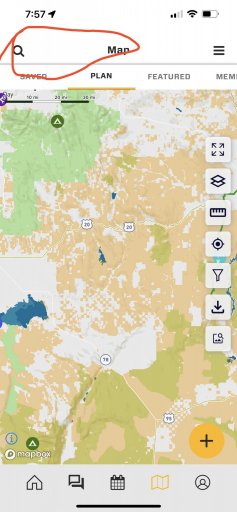
Dave, on the map are you looking at the event tab or planning tab. You need to be on the planning tab inorder to crate a POI or add a GPX file. As far as Expedition Tier… I don’t know… @Michael???
 
  • Like
Reactions: OTH Overland
Dave, on the map are you looking at the event tab or planning tab. You need to be on the planning tab inorder to crate a POI or add a GPX file. As far as Expedition Tier… I don’t know… @Michael???
Ok, I missed the little tabs at the top, switching to the planning tab did the trick, changes the function of the add button and now the upload works. Nice that you can enter all kinds of details about the route, and make it public or private. Getting more happy with the app the more i discover what it will do. Thank you
 
  • Like
Reactions: M Rose
Ok, I missed the little tabs at the top, switching to the planning tab did the trick, changes the function of the add button and now the upload works. Nice that you can enter all kinds of details about the route, and make it public or private. Getting more happy with the app the more i discover what it will do. Thank you
You’re welcome
 
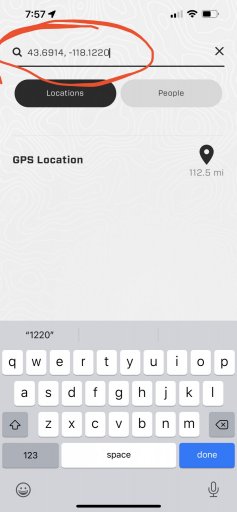
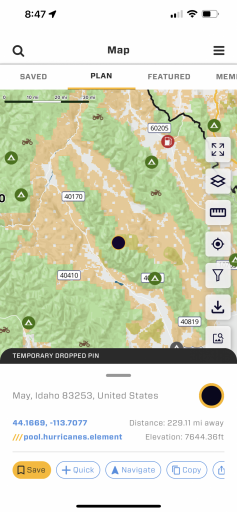
If I have a lat/longitude location, how do I search for it on a map. Was hoping I could just type it in a search and have the map find it.
 
  • Like
Reactions: M Rose
Mike, when i click the yelow plus at the bottom of my map it goes to create rally point , no option to add location.. Is thiis due to being a legacy member and not expedition tier? was trying to uplaod GPX from Gaia from my trip last week. Thanks
@Michael needs to answer this…. But I think so.
 
@Michael needs to answer this…. But I think so.
Nope - this is because you are on the Rally Point Map tab - so the "+" is contextual. Go to the plan tab and you should see the add location option. Still working on streamlining UI - that can be confusing.
 
Nope - this is because you are on the Rally Point Map tab - so the "+" is contextual. Go to the plan tab and you should see the add location option. Still working on streamlining UI - that can be confusing.
Not sure why this one came back up, I asked this question back on May 19th and @M Rose steered me in the right direction back then, totally user nitwitness on my behalf at the time..lol I am still all good on that issue, but sure I have more issues stashed away for later:) but thanks again to both of you!
 
  • Like
Reactions: Michael and M Rose
Not sure why this one came back up, I asked this question back on May 19th and @M Rose steered me in the right direction back then, totally user nitwitness on my behalf at the time..lol I am still all good on that issue, but sure I have more issues stashed away for later:) but thanks again to both of you!
It’s a glitch on my end….
 
  • Like
Reactions: OTH Overland